

You just asked ChatGPT to generate a detailed statistical analysis or solve a complex calculus equation. The output on your screen looks pristine. You highlight the text, hit Ctrl+C, paste it into Google Docs, and confront a total disaster.
Your beautifully rendered math formulas are now a messy block of raw LaTeX code. Chemical equations appear as unreadable gibberish. Tables completely lose their alignment, and Markdown loses all its structural formatting. Instead of saving time, you are stuck manually retyping equations.
See the Final Result Upfront
Before we fix this, look at what the outcome actually should be when you use the proper workflow.
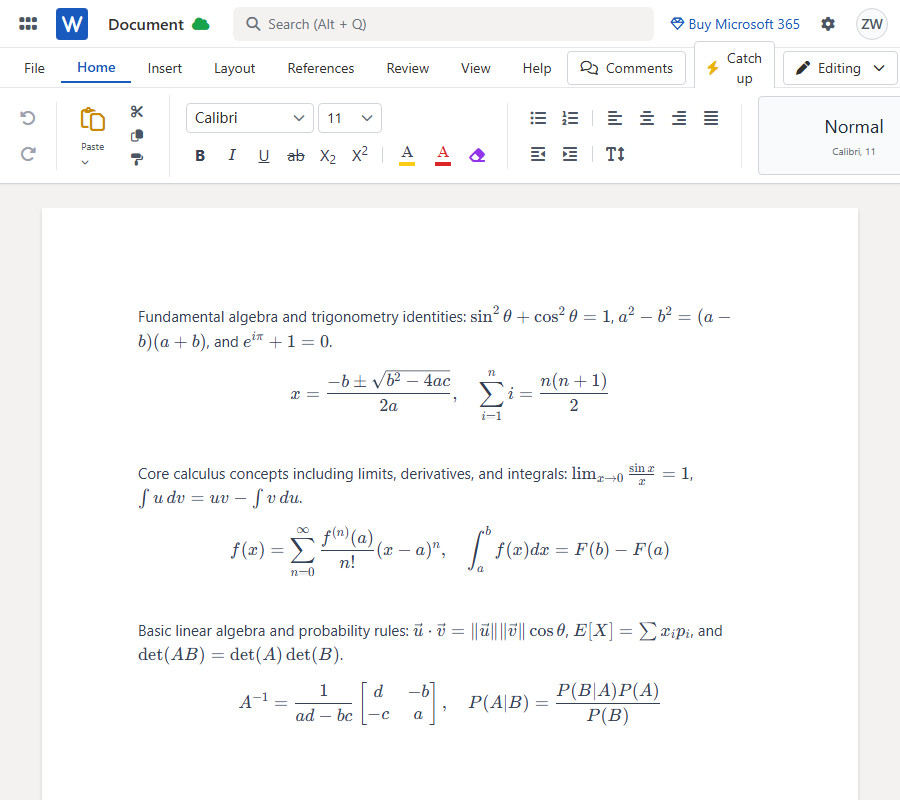
Notice how the complex formulas display flawlessly. The Word native equations are fully editable, tables render perfectly without layout breaks, and the overall layout remains entirely intact. This is the exact file you can drop right into Google Drive.
Why Traditional Copy-Pasting Fails
Why does copying from AI chats fail so miserably? It comes down to how web browsers handle rich text.
Microsoft Word and Google Docs do not natively recognize or parse raw LaTeX directly from your clipboard. AI web page rendering relies on specific background libraries to display math visually. When you highlight that text, you are only grabbing surface-level text, stripping away all the critical structural data.
Dragging your mouse to highlight and copy is the absolute worst way to transfer AI content. If you insist on copying text manually, you MUST click the dedicated "Copy" icon inside the AI chat interface. Never press Ctrl+C directly on the webpage. Even with the copy button, heavily formatted math and code blocks will still frequently break when pasted directly into an empty document.
The Right Workflow
The secret to getting perfect ChatGPT math into Google Docs is bypassing the clipboard completely. You need to convert the AI output into a native .docx file first, which Google Docs can then read flawlessly.
I rely on MarkDocx for this exact step. It is a purpose-built tool designed to convert AI chat conversations into Microsoft Word or PDF. It takes your raw chat data and automatically performs the formatting conversion, turning LaTeX into native Word formulas (OMML). It supports complex markdown, chemical equations, and code blocks with zero manual cleanup.
Step-by-Step Tutorial
Step 1: Grab Your ChatGPT Share Link
The absolute best, highly recommended method is to use a direct share link. Inside ChatGPT, Gemini, or Claude, click the "Share" icon on your conversation and copy the URL. This ensures the parser reads the raw AI data perfectly.
Step 2: Import and Parse
Paste that share link directly into MarkDocx. This one-click parsing bypasses the messy code completely. Instead of dealing with broken syntax like this:
Fundamental algebra and trigonometry identities: $\sin^2\theta+\cos^2\theta=1$, $a^2-b^2=(a-b)(a+b)$, and $e^{i\pi}+1=0$.
$$ x = \frac{-b \pm \sqrt{b^2 - 4ac}}{2a}, \quad \sum_{i=1}^n i = \frac{n(n+1)}{2} $$
Core calculus concepts including limits, derivatives, and integrals: $\lim_{x \to 0} \frac{\sin x}{x} = 1$, $\int u \, dv = uv - \int v \, du$.
$$ f(x) = \sum_{n=0}^{\infty} \frac{f^{(n)}(a)}{n!}(x-a)^n, \quad \int_a^b f(x) dx = F(b) - F(a) $$
Basic linear algebra and probability rules: $\vec{u} \cdot \vec{v} = \|\vec{u}\|\|\vec{v}\|\cos\theta$, $E[X] = \sum x_i p_i$, and $\det(AB) = \det(A)\det(B)$.
$$ A^{-1} = \frac{1}{ad-bc} \begin{bmatrix} d & -b \\ -c & a \end{bmatrix}, \quad P(A|B) = \frac{P(B|A)P(A)}{P(B)} $$
MarkDocx automatically formats the structure behind the scenes.
Step 3: Export and Open in Google Docs
Download your newly generated Word document. Drag and drop the .docx file into your Google Drive, then double-click to open it in Google Docs. Your equations will load as perfectly aligned, native math formulas ready for seamless post-export editing.
Frequently Asked Questions
How to copy ChatGPT formulas to Word?
Stop copy-pasting. Use the ChatGPT Share Link feature and run it through MarkDocx to automatically convert the AI math into native Word equations (OMML).
Why does LaTeX paste as gibberish in Word?
Word does not natively translate raw LaTeX text from a web clipboard into math symbols. You are pasting the backend code rather than the rendered visual equation.
Can Word directly edit ChatGPT equations?
Yes, if imported correctly. When converted to a .docx file using a dedicated parser, the formulas become native Word equations that you can click and edit freely.
How to convert Markdown to Word?
The most efficient way is feeding the AI conversation link into a tool built for Markdown conversion, ensuring your headers, bold text, and lists remain structured perfectly in the final document.