

How to Fix Broken Equations When Exporting Gemini Formulas to Word
You just spent twenty minutes prompting Gemini to generate a detailed mathematical proof or a complex chemical breakdown. The output looks incredible on your screen. Then, you paste it into Microsoft Word. Instantly, every beautiful formula turns into an unreadable, broken mess of slashes and brackets.
Instead of a clean, professional document, you are left staring at
    Core Algebra & Trig: $a^2 + b^2 = c^2$, $\sin^2 \theta + \cos^2 \theta = 1$, $e^{i\pi} + 1 = 0$, $\log_b(xy) = \log_b(x) + \log_b(y)$.
$$ x = \frac{-b \pm \sqrt{b^2 - 4ac}}{2a}, \quad \sin(\alpha \pm \beta) = \sin\alpha \cos\beta \pm \cos\alpha \sin\beta $$
Calculus limits & derivatives: $\lim_{x \to 0} \frac{\sin x}{x} = 1$, $\frac{d}{dx}(x^n) = nx^{n-1}$, $\frac{d}{dx}[f(g(x))] = f'(g(x))g'(x)$.
$$ \int_a^b x^n dx = \left[ \frac{x^{n+1}}{n+1} \right]_a^b, \quad \int u \, dv = uv - \int v \, du, \quad f(x) = \sum_{n=0}^{\infty} \frac{f^{(n)}(a)}{n!}(x-a)^n $$
Linear Algebra & Probability: $P(A \cup B) = P(A) + P(B) - P(A \cap B)$, $\vec{u} \cdot \vec{v} = |\vec{u}||\vec{v}|\cos\theta$, $E(X) = \sum x P(x)$.
$$ \det \begin{pmatrix} a & b \\ c & d \end{pmatrix} = ad - bc, \quad A^{-1} = \frac{1}{ad-bc} \begin{pmatrix} d & -b \\ -c & a \end{pmatrix}, \quad P(A|B) = \frac{P(B|A)P(A)}{P(B)} $$
If you are dealing with a Gemini formula export where every equation is broken, you are not alone. Tables lose their alignment, markdown headers disappear, and chemical equations become completely uneditable.
The Final Result: What Your Export Should Look Like
Before we dive into the technical fix, look at exactly what a proper document export achieves:
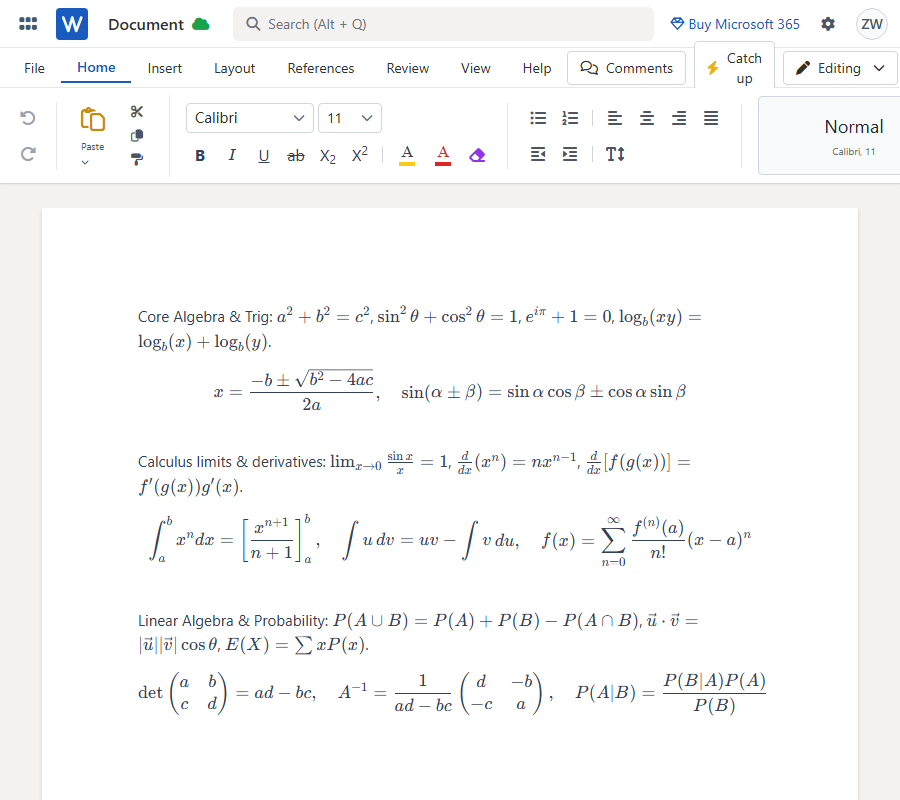
When processed correctly, complex formulas display flawlessly. These aren't just flat, uneditable images pasted into a document. They are converted into Word native equations, meaning they are fully editable. Tables render perfectly without any layout breaks, and the entire structural formatting remains completely intact.
Why Traditional Copy-Pasting Ruins Your Formatting
The reason your equations are breaking comes down to how data moves from your browser to your desktop software. Microsoft Word simply does not natively recognize or parse raw LaTeX formatting out of the box.
More importantly, user habits cause massive data loss. If you drag your mouse to highlight text and press Ctrl+C, you are immediately destroying critical structural data.
If you insist on manually copying the content, you MUST click the dedicated "Copy" icon at the bottom of the Gemini chat interface. Do not highlight text manually. However, even when you use the official copy button, pasting directly into Word often fails because AI web page rendering does not translate neatly into native Word document styling.
The Right Solution for Gemini Documents
To bypass clipboard limitations and formatting disasters, I finally found a workflow that actually gets the job done: MarkDocx.
MarkDocx is a specialized tool built specifically to parse AI conversations. Instead of fighting with raw text, it takes your AI output and maps it directly to native Word features. Markdown syntax automatically converts to rich-text formatting, and chemical equations render correctly without spitting out gibberish. It also supports seamless PDF exports if you need a locked document.
Step-by-Step Tutorial: The Best Way to Export
This is the highly recommended method. By utilizing Gemini's native sharing feature, you completely avoid all clipboard errors.
Step 1: Generate a Gemini Share Link
At the bottom of your Gemini response, click the "Share & export" icon. Select "Share" to generate a public link for that specific conversation. This allows the system to capture the exact underlying formatting.
Step 2: Import into MarkDocx
Open MarkDocx and paste your Gemini share link directly into the import bar. This share link method is the absolute best workflow because it automatically parses the entire AI conversation accurately, completely bypassing your computer's clipboard.
Step 3: Export Your Document
Click the export button to generate your Word (.docx) or PDF file. Every single math formula is converted into native, fully editable Word equations (OMML). You can immediately open the file and start making your final edits seamlessly.